New Blog

代码人生:编织技术与生活的博客之旅

1. Shortcuts

1.1 Open from Command Line

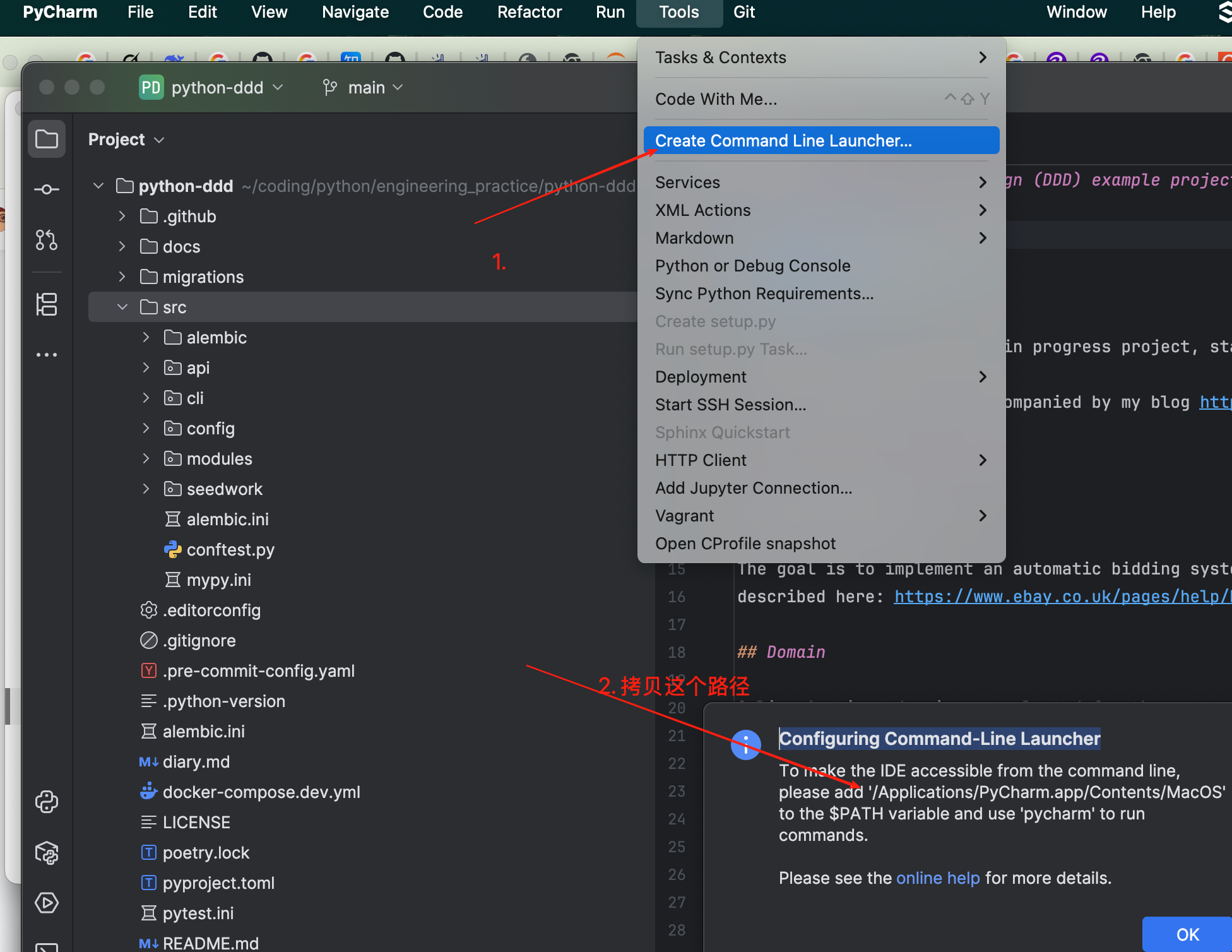
PyCharm --> Tools --> Create Command-line Launcher

image-20250529103513168

echo 'export PATH="/Applications/PyCharm.app/Contents/MacOS:$PATH"' >> ~/.zshrc
source ~/.zshrc
pycharmToolsOne min read

Vocabulary

WordMeaningExamples
autonomySelf-governance, independence"The region gained autonomy after years of struggle."
"She values her autonomy and makes her own decisions."
advocateTo advocate, support"She advocates for women's rights in her community."
"He is a strong advocate of renewable energy."
Self-advocateTo speak up or defend oneself
RescindedWithdrawn
disclaimerDisclaimer or exemption clause
refineRefine, purify, improve, perfect, optimizerefine one's skills
refine a process
refined taste
lengthyLong, prolongedThe meeting was so lengthy that everyone felt exhausted.
He gave a lengthy explanation, but no one understood his point.
The legal process can be lengthy and expensive.
consentAgree, permissionPatients must sign a consent form before surgery.
Consent should be enthusiastic and ongoing. (sexual consent)
The app collects data only with user consent.
frustrationFrustration, disappointmentHis constant interruptions filled her with frustration.
The team's frustration grew after months of delays.
conductedOrganize or executeA survey was conducted to collect public opinions.conduct research, conduct a meeting, conduct an interview
siloInformation siloThe marketing and sales teams work in silos, causing inefficiency.Antonym: cross-functionalBreak down silos
The CEO aims to break down silos between departments.
Silo mentality
A silo mentality harms innovation.
whimsicalWhimsical, fancifulThe room was decorated in a whimsical style, with bright colors and playful patterns.
His whimsical decision to wear mismatched socks made everyone smile.
The movie's whimsical storyline took the audience to a magical world.
Diary2 min read

Common Abbreviations in International Projects

AbbreviationFull FormMeaning
PoCProof of ConceptProof of Concept, more oriented towards technical validation
MVPMinimum Viable ProductA releasable product with basic functionality, while PoC is more oriented towards technical validation.
PrototypePrototype: focuses on interface or process simulation, PoC emphasizes underlying feasibility
MoS
L&DLearning and DevelopmentLearning and Development
CVCurriculum VitaeA detailed summary of personal academic and professional experience and abilities, usually used for job applications, academic applications, or professional evaluation. It differs from a Resume, as a CV is more comprehensive and longer, especially suitable for academia, research, medical fields, etc.
endorsementRecommendation/Endorsement: Others' recognition of your skills, professional abilities, or work performance, which can enhance your credibility and competitiveness.
CPQConfigure, Price, QuoteIn the context of Salesforce software, CPQ is a specialized sales tool designed to help businesses simplify the configuration, pricing, and quoting process for complex products
Sales FunnelA sales funnel refers to the entire process from when a potential customer first learns about a brand to the final transaction
Pursuit team
peer-to-peerDirect dialogue or exchange without intermediaries
MoSMethod of Statement
Means of Verification
"The project team defined the MoS to ensure all deliverables meet the requirements."
"Our MoS includes regular inspections and stakeholder reviews."
plsplease
urYour
FOMOFear Of Missing Out"Fear Of Missing Out"
you seriously don't want to feel the FOMO!
JOMOJoy Of Missing OutJoy Of Missing Out
WIPWork in Progress

Common Phrases

PhraseMeaningCommon Usage
cold emailCold emailIntroducing company products to potential customers to establish contact or close deals
outreach message"Outreach message" or "promotional message"
shift gearsLiterally means "shifting gears" (like in a car), but is more often used metaphorically to mean "changing topics, changing methods, or adjusting pace"He shifted gears from third to fourth on the highway.
Let's shift gears and discuss the budget next.
After 10 years in finance, she shifted gears to become a teacher
The team shifted gears in the second half, focusing on defense.
Shift gears mentally
"After work, I need time to shift gears mentally before family time."
Shift gears quickly
Startups must shift gears quickly to adapt to market changes.
skill hoardingSkill hoarding: refers to individuals or organizations deliberately limiting the sharing of knowledge or skills to ensure their own irreplaceability or competitive advantage in the workplace
Diary2 min read

一、系统概述

通过AI技术实现车辆登船记录的自动化、智能化管理,利用高精度车牌识别、实时状态监测和数据分析,提升船舶调度效率,降低人工成本。系统支持高可靠性、可扩展性和复杂环境适应性。

二、系统架构设计

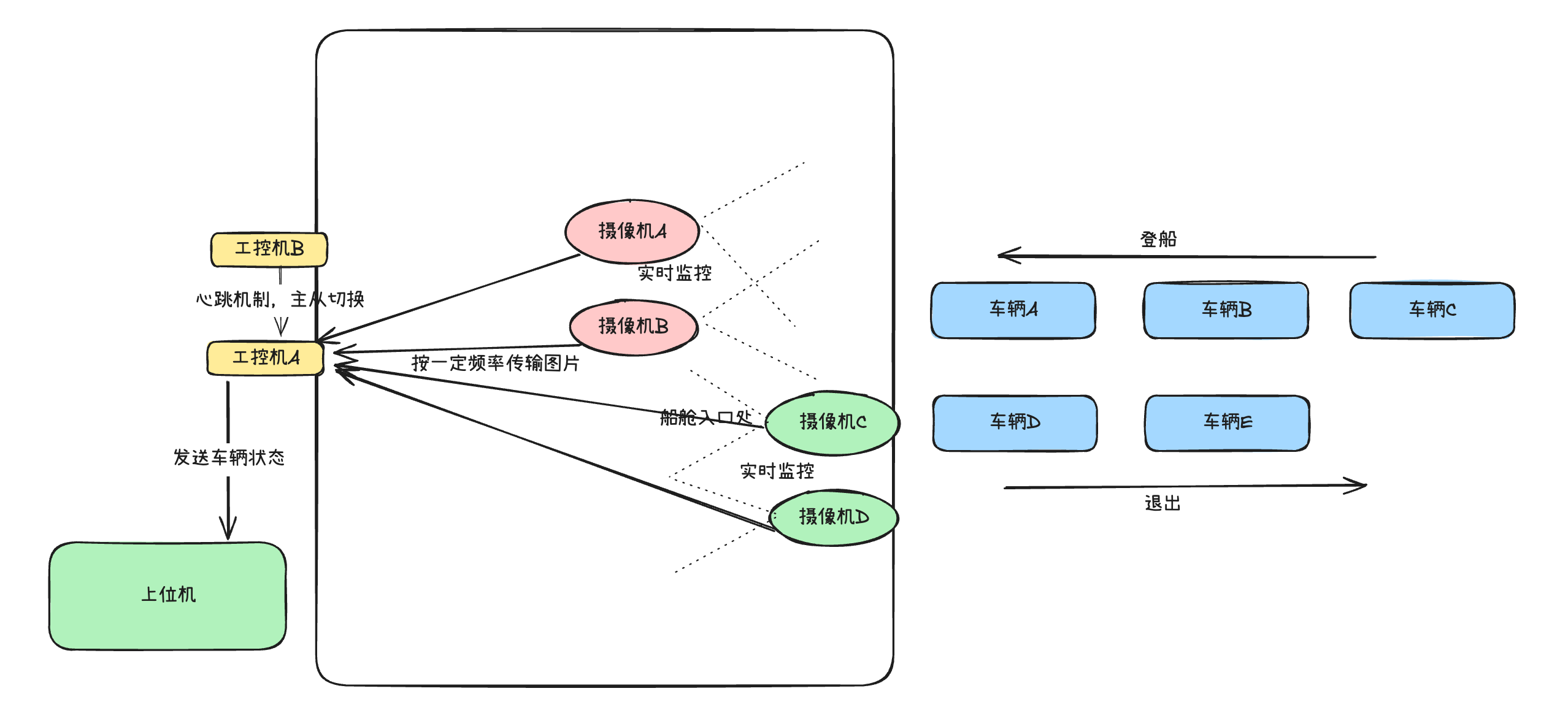
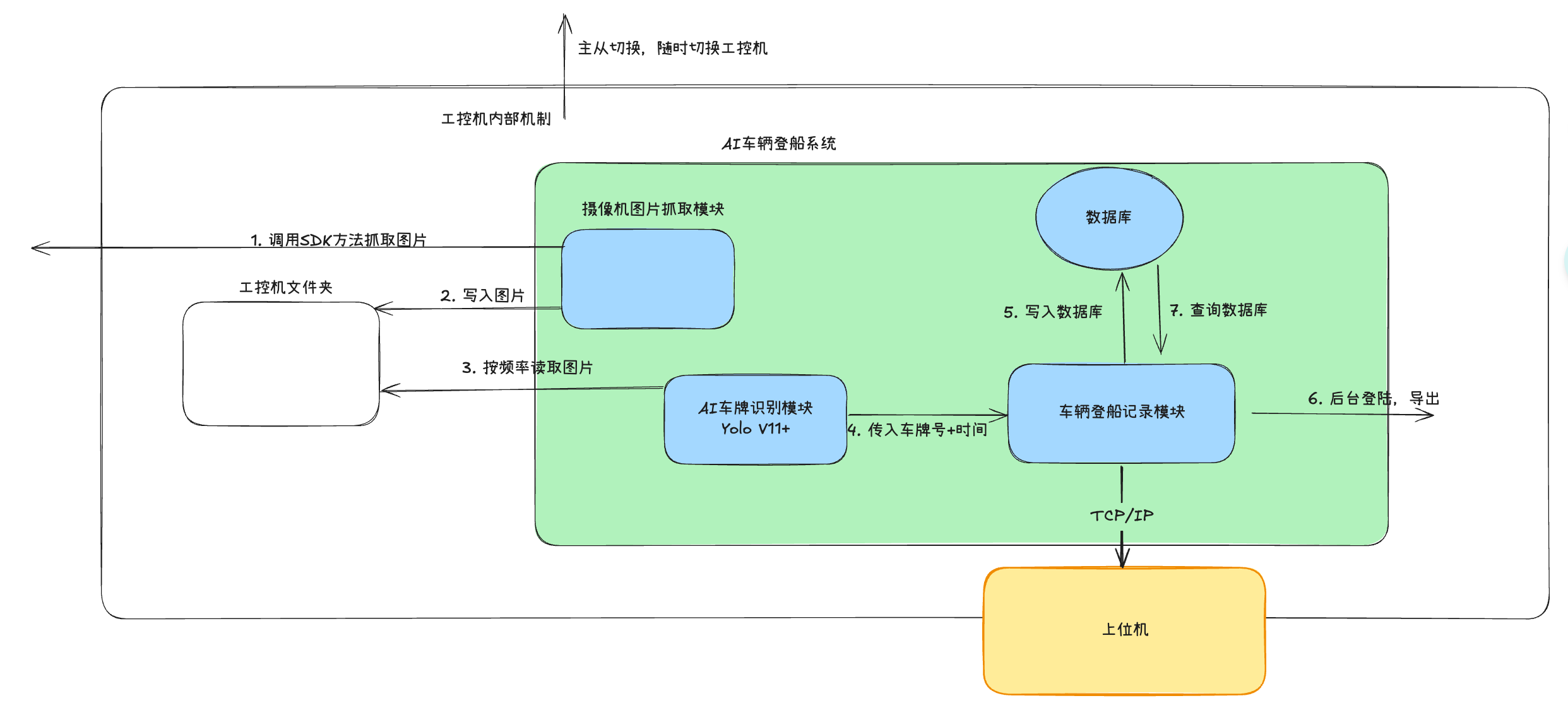
image-20250523170550316

image-20250523172342859

1. 硬件配置

车牌识别摄像头:

  • 型号:预算足的话最好400万像素以上工业摄像头,配备夜间红外补光。
  • 部署位置:船舱出入口,2-5米高度,俯拍车辆/平视车辆。
  • 防护等级:IP67,适应码头潮湿、盐雾环境。
  • 数量:每个泊位口部署四台摄像机,两台监控入场车辆,两台监控出场车辆

处理终端:

  • 工控机:8核,32G内存以上。
  • 存储:512G以上磁盘空间。
  • 系统:Windows/Linux均可。
  • 数量:2台,一台主设备,另一台做备用机

通讯模块:

  • 连接方式:网线连接,基于TCP/IP协议,支持4G/5G备份链路。
  • 带宽需求:≥10Mbps,确保数据实时传输。

设备控制箱:

  • 防护等级:IP66,内置温控系统,防潮、防尘。
  • 集成设备:工控机、交换机及NVR(网络视频录像机)。
  • 可选配置:配备UPS(≥30分钟续航),防止突然断电。

2. 软件架构

车牌识别模块:

  • 技术栈:Python + OpenCV + PyTorch。
  • AI模型:YOLOv11(目标检测)+ CRNN(字符识别)/PaddleOCR,具体可能在做的过程中比较效果。
  • 功能:实时解析摄像头画面,提取车牌号,识别准确率目标>99%。

车辆登船记录、数据管理、报表生成模块:

  • 数据库:Postgres。
  • 技术:Flask,Pandas + OpenPyXL。
  • 功能:记录车辆进出时间、状态,生成历史记录,生成Excel/CSV格式报表,包含车牌号、登船/退出时间、状态等,支持异常高亮。

三、AI功能实现

1. 技术方案

模型选择:

  • 目标检测:YOLOv11,检测车牌区域,适合实时场景。
  • 字符识别:CRNN + CTC Loss/PaddleOCR,处理车牌。
  • 数据增强:旋转、模糊、亮度调整,提升模型鲁棒性。

训练与优化:

  • 数据集:乙方采集码头实际场景数据(≥1万张标注图像),包含污损、遮挡、夜间等场景。甲方等待摄像头安装完成,配合找一些车辆进出采集数据,乙方使用Labelling标注车牌位置及字符。
  • 迁移学习:基于预训练模型微调,缩短训练周期。

智能校验:

  • 规则过滤:校验车牌格式(如长度、字符规则)。
  • 异常处理:污损/遮挡车牌时,触发人工补录接口。

2. 功能实现

基础功能:

  • 实时车牌识别:捕捉车辆进出画面,提取车牌号。
  • 状态判定:基于车辆轨迹(通过多帧分析),判断登船/退出状态。
  • 数据记录:存储车牌号、时间、状态,生成自动化报表。

扩展功能:

  • 智能预警:车辆停留超过一定时间或者车辆异常进出将会提出预警。
  • 数据分析:统计登船高峰时段、异常频率,生成可视化图表(使用Matplotlib/Seaborn)。
  • 多功能扩展:提供API查询车辆进出状态,供后续开发集成。

四、外部接口、内部模块交互

1. 工控机和上位机接口定义

  • 协议类型:HTTP,POST请求

  • 需要确保工控机和上位机在同一网段

  • 登船json

    • 其中request 里面字段:

      • servicecodeWebApi_Vehicle_Onboard_Offboard_Status, 表示车辆登船状态(定义里面说只能有10位长度,但是其他案例有很长的例子,所以我取这个,如果不合适,可以跟我方反馈,我放修改)
      • appid需要甲方提供(表示应用名称)
      • reqid由每次调用我方生成
      • 加密key:需要由甲方提供,由此生成signdata,  
    • param:

      • berthCode: 泊位code,需要和甲方保持一致,可以甲方提供给我们,

        • 目前我们设置为: "1A" - "16A"
      • timestamp: 时间戳

      • type: 登船,还是离船

        • "onboard":登船
        • "offboard": 离船
      • status:

        • 1表示在正确的泊位
        • 0表示不在正确的泊位
      • time: 时间戳,UTC+8(北京时间)

{
"request": {
"appid": "AH856BDC-9F3E-487E-671D-C84DEA45EB24",
"reqid": "B683DA45-D4C3-45DB-AB60-8DEEECB6DE10",
"protover": "1.0",
"servicever": "1.0",
"requesttime": "20250606142930276",
"reserve": "",
"servicecode": "WebApi_Vehicle_Onboard_Offboard_Status",
"signdata": "556EDDE1D05C3ABA63535D57A0A68F1D"
},
"param": {
"berthCode": "1A",
"vehicleNo": "粤B·CD456",
"status": "1",
"type": "onboard",
"time": "20250606142930276"
}
}

2. 双工控机主从切换模块

  • 主要架构

    • 双节点架构:NodeA + NodeB

    • 工作模式:

      • 主节点:执行核心业务

      • 备用节点:实时监控+热备数据

    • 切换方式:自动故障切换 + 手动强制切换

  • 核心技术

    • 心跳检测:UDP广播 + 自定义协议(1s/次)

    • 故障判定:连续3次心跳丢失 + 硬件自检

  • 技术栈

    • Python,ZeroMQ, Protobuf

五、工期安排

任务名称时间备注
1. 项目启动与需求确认3天确认需求、硬件选型、接口标准。
2. 硬件采购与部署一周采购4MP+摄像头、工控机、UPS等;安装。
3. 数据采集与模型训练两周采集码头车牌数据(1万张);
训练YOLOv11+CRNN/PaddleOCR模型,优化准确率。
4. 软件开发两周开发车辆登船记录、数据管理、报表生成模块。
5. 上位机通信模块一周开发与上位机进行通讯的模块
6. 工控机主从切换功能一周设立机制,让两台工控机可以进行主从切换
7. 系统联调与测试一周功能测试、压力测试、异常测试。
8. 部署与验收一周现场部署、用户培训、生成自动化报表、验收。

预计总工期:50天

算法商业项目5 min read

我们在做算法类项目的时候,通常需要在客户机器上部署,无论是windows还是centos,都需要装一些软件以及程序,下面分享我经常会装的内容,希望对你有帮助,可以提升速度。

1. windows

  • 传统行业的客户使用windows的比较多,因此这部分先说
  • windows可能有登陆密码,找客户先要到,当然最好还是先暂时取消登陆密码,免得麻烦
  • 先检查配置,GPU显存,内存大小,C盘容量,其他盘容量
    • GPU显存的大小以及内存大小决定了很多模型能不能用
    • C盘要预留一些空间,作为系统盘满了会导致很卡
  • 防火墙关闭
    • 为了防止安装一些东西出幺蛾子,开始阶段还是关了吧
  • 有些软件,还是先装了吧
    • Google Chrome浏览器(当然Edge也可以),反正IE太垃圾

1.1 远程控制软件

需要这类软件的原因不言而喻,我们经常接的项目不像公司中正常坐班或者出差,可以接触物理机,

一般都是在远程,利用空余时间来做,通常就需要远程控制软件来远程操作。

1.1.1 向日葵

  • 官网地址
  • 注意事项:
    • 第一次让客户给你设置一个永久登陆密码,否则开机重启后,密码会变
  • 好处
    • 自带文件传输功能
    • 允许多端登陆
    • 不收费

1.1.2 window自带远程桌面

  • 这个我只用过一次,因为客户用的机器是windows server,只给我提供这个,我个人不太喜欢

1.1.3 TeamViewer

  • 我用的也很少,因为后来开始收费了(😂)

1.2 文件传输类

我们经常遇到需要传文件,软件,代码去客户机器的场景,下面分享我常用的几个技巧

1.2.1 网站互传

  • 有很多网站,采用中转传输的方式,比如轻松传
  • 好处
    • 非常方便,不用安装任何软件,能访问网络即可
  • 坏处
    • 大文件还是有点耗时
    • 离线传送需要VIP了
    • 敏感文件最好不用通过这种方式(毕竟是先把文件传送到网站的服务器)
      • 当然也可以选择加密压缩后再传输

1.2.2 其他软件附带功能

  • 很多软件主业并不是做这个文件传输的,但是也慢慢被聪明的用户拿来做文件传输了
  • 比如
    • 向日葵的文件传输
    • 百度云,夸克云等各种云盘

1.2.3 git, gitee

  • 是的,你没有看错,我说的就是你经常用的git
  • 使用好git,很多时候还是很方便的
    • 你自己机器上代码修改后就直接提交,客户机器上一pull一下即可
  • 坏处
    • 对大文件不太好
    • 客户机器上最好不要修改,不然容易冲突

1.3 python开发工具包

  • 既然做算法的,基本上很难饶过python了
算法商业项目3 min read

本地智能知识库使用手册

1. 启动

​ 因为知识库背后需要一些软件,交付之前已经设置开机启动,所以无特殊情况不用进行1.1,可以直接看1.2进行登陆访问

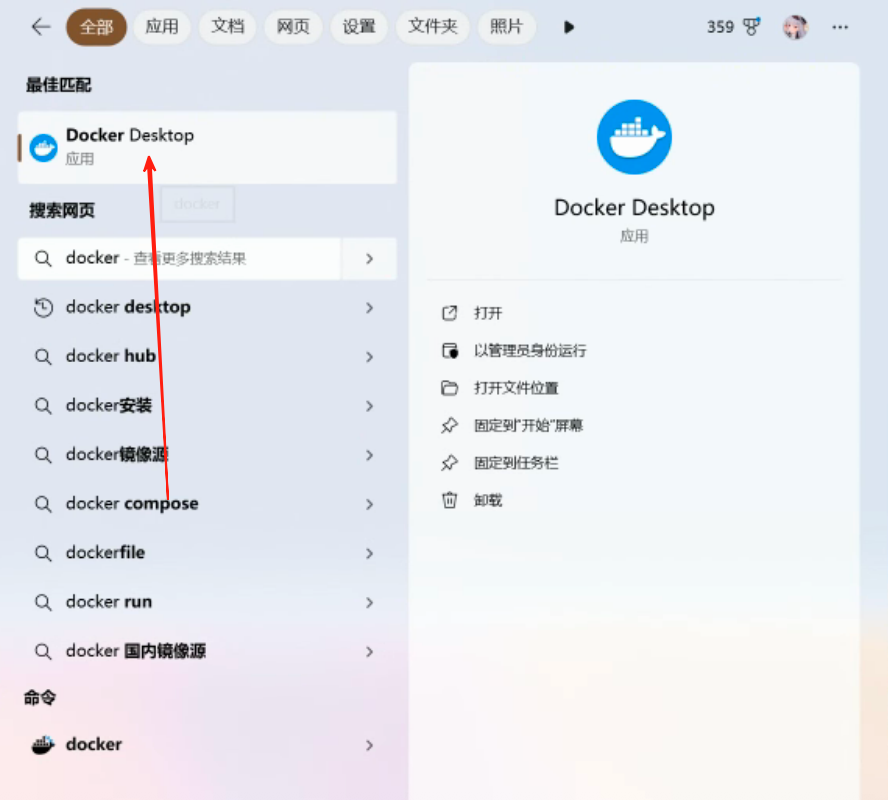
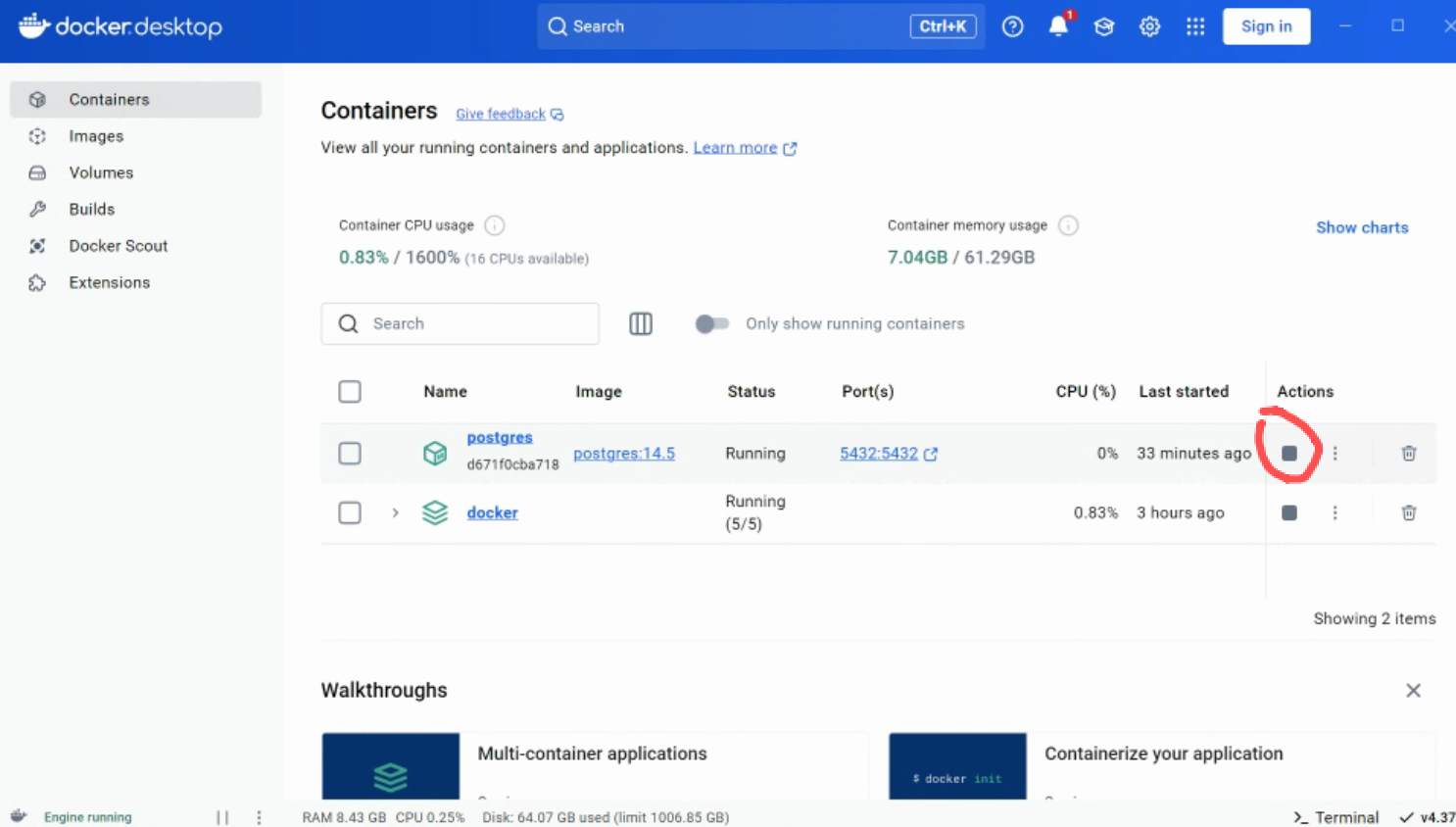
1.1 启动Docker Desktop

​ 在搜索栏中搜索 Docker Desktop,直接点击打开,然后就不用管了,可以把它最小化,以免干扰

image-20250430153423704

1.2 注册

找到任意的浏览器,搜索localhost,并回车即可看到登陆页面,可以先进行注册

在注册界面依次填入邮箱,用户名,密码即可

image-20250504172840703

1.3 登陆访问

在登陆页面输入你的信息

image-20250430153626993

​ 初始管理员邮箱: admin@test.com , 密码: 123456

​ 后期可以自己修改

2. 简单使用

​ 我们期望本地智能知识库可以给我们提供业务上的帮助,所以一般使用聊天对话的方式和知识库互动,获取自己想要的信息。

​ 点击页面标题中间的“聊天”,可以看到页面的变化

​ 这里左侧提供了两个聊天助手,一个是“统计分析助手”,另一个是“通用知识库助手”,可以根据需求不同,来找对应的助手进行“咨询”

​ 两个助手的区别在于,提示词不同以及所使用的知识库不同。

image-20250430162943704

2.1 通用知识库助手

**使用场景:**对业务不太熟悉,直接询问某些业务的技术术语解释,助手会给出基于已有行业知识文件的内容来进行解析。

使用方式:点击“通用知识库助手”,找你之前的某个聊天,或者点击聊天右侧的➕号,新建一个。

然后直接提问即可,比如我这里提问:“OLT是什么”,他会根据我的问题,先去本地知识库中搜索相关的文件,接着结合大模型的回答进行回答。

image-20250430163551684

2.2 统计分析助手

**使用场景:**想基于已有的某个文件或者某些文件进行数据分析。

使用方式:点击“统计分析助手”,找你之前的某个聊天,或者点击聊天右侧的➕号,新建一个,步骤和2.1类似,不再赘述。

本助手和前一个助手有所区别的是,所用知识库中有一些excel,可以用来对excel中的数据提供基本的数据分析。

3. 维护行业知识文件

​ 作为一个本地知识库,和一般大模型不同的就是我们可以维护自己的知识库,以期望大模型可以帮我们回答一般通用大模型(Deepseek R1)无法回答的问题,而本地的知识是需要通过某种方式给到我们的软件。

3.1 知识库介绍

image-20250430155058488

这里有两个知识库:表格知识库 以及 通用知识库

  • 表格知识库可以对excel,csv等表格型的文件更好的处理和管理
  • 通用知识库可以对一些PPT,word,PDF等格式更好的处理和管理

3.2 上传文件到知识库

进入某个知识库,这里以通用知识库为例,

点击新增文件,选择本地文件

image-20250504171809039

勾选创建时解析,然后点击上传文件或者拖拽上传,点击确定即可

image-20250504171909821

解析会占用一定的时间,等待这里的状态变为完成才可使用这个文件中的内容

image-20250504172042200

  • 注意,虽然可以处理比较大的文件,但是最好不要超过一定的大小,比如30M,解析会比较慢

3.3 从知识库中删除文件

在知识库中可以对文件进行删除或者其他操作

image-20250504172200785

4. 人员管理

一般部署本地知识库是给整个团队或者公司提升效率,为了避免多人使用同一个账号带来的隐私性问题,支持多账号登陆管理。

4.1 添加人员

先让其他团队成员按照1.2,1.3注册登陆,

然后管理员(你)按照如下操作

image-20250504172527632

image-20250504172551256

输入正确的团队成员邮箱之后,即可发送邀请 image-20250504173154481

而被邀请同事来到相同的界面(用他自己的账号登陆),则可以看到需要他同意

image-20250504173750974

被邀请人同意之后,admin这里会看到角色状态的变更:

image-20250504174102555

此时其他团队成员也可以看到所有的知识库了(需要admin在知识库的设置中权限设置为“团队”)

image-20250504174636910

但为了防止API key的滥用,如果其他人员需要添加文件,是不允许的,需要自己绑定自己的API key来使用

4.2 删除人员

在团队成员列表中的末尾有个删除按钮

image-20250504174812483

5. 大模型配置

5.1 LLM大模型的配置

LLM表示聊天对话大模型,用来在聊天助手对话那块。

目前因为机器的配置原因采用的是线上满血DeepSeek R1版,如果后期需要修改,可以通过如下步骤进行修改:

image-20250504175252953

接下来的对话框会让你提供一个API-Key

image-20250504175305478

不同的大模型的API-Key获取方式不太一样,但思路是一样的:

首先来到对应的官网,比如DeepSeek(https://platform.deepseek.com/api_keys)

进入后来到API-Keys,点击创建

image-20250504175607557

输入名称,点击创建

image-20250504175653670

然后会弹出一个对话框,显示了API Key,点击拷贝复制到我们的网站上(注意这里的API-Key只会出现一次,最好找个地方记下来,否则忘记的话只能删了重新创建了

image-20250504175750264

我们粘贴刚才的API Key,

image-20250504175909776

可以看到添加成功:

image-20250504175938664

那既然在系统里面添加了LLM模型,我们就可以在聊天助手中使用了

image-20250504180056048

在聊天助手的右侧鼠标停留一段时间,会出现编辑按钮

image-20250504180158885

在新对话框,模型设置的tab下面就可以选择新的模型了

5.2 Embedding模型的配置

Embedding模型主要是用来解析本地文件的,把本地知识向量化,这样后期检索会更快。

可以也按照5.1的方式找添加一个带embedding标识的大模型即可

之后来到表格知识库,可以设置embedding的模型了: image-20250504180431732

RAG使用交付6 min read

算法商业项目One min read

Shortcuts

1. Plugins

  • intellij-idea-keybindings

  • Material Icon Theme

2. Settings Tips

  • Enable auto-save

  • Set directory indent to a larger value

3. Shortcuts

  • macOS: Command + Shift + P to open command palette, search for shell, install
vscodeToolsOne min read

1.1 View History Commands

1.1.1 Basic Viewing

  1. View all
    • Command line: history
    • Shortcut to view all: Command + Shift + H
  2. Fuzzy matching
    • Command line: history | grep python
    • Shortcut: Ctrl + R

1.2 Using History Completion in iTerm

1.2.1 Built-in Shortcut Command + ;

  1. Enter command prefix:
    • In iTerm's command line, enter a command prefix, for example, gcloud
  2. Press shortcut: Command + ;, iTerm will pop up a window listing all history commands starting with your entered prefix in the current session.
    • Example: Enter a command prefix in iTerm command line: gcloud
  3. Select and complete:
    • Choose the command you need from the popup list, and it will auto-complete. Then you can modify it yourself.

Downside: Display is not complete

Note: To solve the cross-session history saving issue with Command + ; completion in iTerm2 and ensure Shell correctly saves history: vi ~/.zshrc edit the file and add at the end:

# Set history file size and save location
HISTFILE=~/.zsh_history # History file path
HISTSIZE=10000 # Number of history entries saved in memory
SAVEHIST=10000 # Number of entries saved in history file

# Append history (instead of overwriting)
setopt appendhistory # Merge history from multiple sessions
setopt inc_append_history # Append history in real-time (no need to restart session)
setopt share_history # Share history across sessions
setopt extended_history # Record timestamps

Apply changes: source ~/.zshrc

1.2.2 Advanced Completion Feature

If you want to achieve the following effect, showing gray suggestions while typing: iTerm command auto-completion

Configuration Method

Using zsh and oh-my-zsh:

  1. Install oh-my-zsh (if not already installed): Run sh -c "$(curl -fsSL https://raw.github.com/ohmyzsh/ohmyzsh/master/tools/install.sh)".
  2. Install zsh-autosuggestions plugin:
  • Clone the plugin to oh-my-zsh's plugin directory: git clone https://github.com/zsh-users/zsh-autosuggestions ~/.oh-my-zsh/custom/plugins/zsh-autosuggestions
  • Edit .zshrc file, add zsh-autosuggestions to the plugin list: plugins=(zsh-autosuggestions) (add a new line)
  • Save and restart iTerm2, or run source ~/.zshrc to apply the configuration.
...
# Add wisely, as too many plugins slow down shell startup.
plugins=(git)
plugins=(zsh-autosuggestions)
...

Usage Method

Similar to before, enter a prefix, and matching history commands will automatically appear in gray. If you accept it, press -> arrow key. If not, use up/down arrows to navigate.

itermTools2 min read

Authentication Problem

How to confirm whether a user belongs to a certain residential community based on location

How to exclude virtual cheating

Problems That Can Be Solved

Many home service fees are expensive. Utilizing community characteristics, chain scheduling allows service workers to visit multiple homes in a day

This can both increase the number of households a worker can handle per day and reduce costs

https://www.heroui.com/

ideaEntrepreneurshipOne min read