下定决心还是再学一遍 CSS 等前端知识
大纲
CSS 文本属性
text-decoration
-
text-decoration(常用):用于设置文字的装饰线
- none:无任何装饰线,可以去除 a 元素默认的下划线
- underline: 下划线
- overline: 上划线
- line-through: 中划线
-
企业中常用的
css/reset.css在里面设置, 在 html 通过 link 引入
a {
  text-decoration: none;
}
text-transform
- text-transform(一般)
- capitalize(每个单词的首字母大写)
- uppercase 大写
- lowercase 小写
- none 没有任何影响
text-indent
- text-indent(一般): 设置第一行内容的缩进
font-size: 40px; text-indent: 80px;text-indent: 2em;
text-align
- text-align(重要)
- 直接翻译过来设置文本的对齐方式
- MDN:定义行内内容(例如文字),如何想对它的块 父元素对其
- 常用的值
- left
- right
- center
- justify: 两端对齐,基本很少用
- 需要和
text-align-last: justify一起配合用
- 需要和
- W3C
- This shorthand property sets the 'text-align-all' and 'text-align-last' properties and describes how the inline-level content of a block is aligned along the inline axis if the content does not completely fill
word/letter-spacing
- word/letter-spacing
letter-spacing: 10px;word-spacing: 10px;
CSS 字体的属性
font-size
- 常用设置
- 具体数值 + 单位:默认为 16px(浏览器设置我们自己的大小就是 16px)
- em
- 百分比
- 可以继承
font-family
- 用于设置文字的字体名称 - 可以设置 1 个或者多个字体名称 - 浏览器会选择列表中第一个该计算机上有安装的字体 - 或者是通过
@font-face指定的可以直接下载的字体 可以继承
font-weight(重要)
- 用于设置文字的粗细(重量)
- 常见的取值
- 100, 200, 300, 400, 500, 600, 700, 800, 900, 每一个数字表示一个重量
- normal: 等于 400
- bold: 等于 700
- strong, b, h1-h6 默认设置的就是 bold
font-style(一般)
-
设置文字的常规,斜体显示
- normal
- italic:斜体,字体本身支持斜体时,显示的斜体
- oblique:斜体,不管字体支持不支持斜体,都给字体做倾斜,看起来像斜体
-
早期 em, i, cite, address, var, dfn 等元素的 font-style 默认就是 italic
font-variant(了解)
可以影响小写字母的显示形式,variant 是变形的意思
可以设置的值如下: - normal - small-caps 将小写字母替换为缩小过的大写字母 - My Name Is ->
line-height(常用)
-
用于设置文本的行高
- 可以先简单理解为一行文字所占据的高度
-
为什么文本需要行高
- 方便文本的阅读和理解
-
严格定义
- 两行文字(基线)之间的间距
- 基线:与小写字母 x 对齐的线
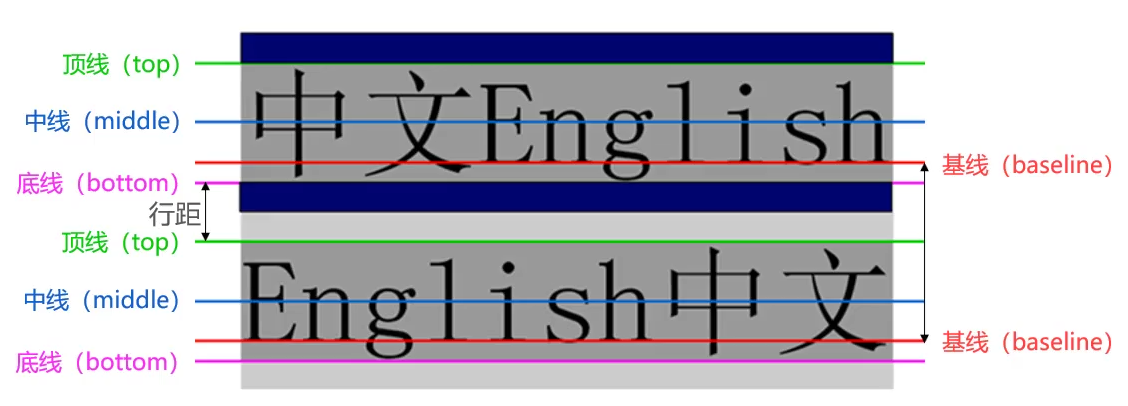
- line-height - 文本的高度 = 行距
- 文本默认会在一行的中间显示
font
-
font 是一个缩写属性
- font-style
- font-size
- font-weight
- font-variant
- font-family
- line-height
- font-style font-variant font-weight font-size/line-height font-family;
-
规则
- font-style font-variant font-weight 可以随意调换顺序,也可以省略
- /line-height 可以省略, 如果不省略,必须跟在 font-size 后面
- 如果是数值,表示 2 倍或者 1.5 倍前面的行高
- font-size, font-family 不可以调换顺序,不可以省略
font-size: 30px;
font-weight: 700;
font-variant: small-caps;
font-style: italic;
font-family: serif;
line-height: 30px;

font: italic small-caps 700 30px/30px serif;